From the first animatic , I found a big problem :All the elements just crowed and placed together with no space or contract in them, also ,the whole animatic movie we've just finished has no colour in it.
My progamme of study is :concept art for the environment ,which requires a lot of elements: compostion, the contrast of colours,space etc. We prepared all the materials ready to use, but without the design for them, they will never become an successful movie.
So in the period of time from after the texture to the end of july,my mission is :
1.finish all of the conceptual design for every shot
2.keep the feeling of the film with colours
3.finish the high resolution matte paintings for shot001 ,002,008,011,009.
4.keep communicating with comp team to make sure my work is benefit for their final comp work.
5.keep on doing the reference and inspiration collecting .
Saturday, 3 August 2013

First animatic
http://www.youtube.com/watch?v=y22wK4bHIlU
After I ve finished the character's texture, I began to help Michael with the environment modeling in 3D. I want the effect to be damaged and complex to confuse the audience .So I created the damaged bridges and pillars for the shot 009 mainly. For the first animatic , I was in charge of the three shots which have pillars in it. I roughly placed the pillars to match the live action in Maya.
My program of study is mainly about the environmental design , this was the first try of place elements to make the composition of the shot as good as possible.


 To place the elements to let them feel suitable for the scene and also have space and contrast, I didn't just put every useful details in it, i left some space for the scene to let the audience feel can breathe.
After I ve finished the character's texture, I began to help Michael with the environment modeling in 3D. I want the effect to be damaged and complex to confuse the audience .So I created the damaged bridges and pillars for the shot 009 mainly. For the first animatic , I was in charge of the three shots which have pillars in it. I roughly placed the pillars to match the live action in Maya.
My program of study is mainly about the environmental design , this was the first try of place elements to make the composition of the shot as good as possible.


Friday, 2 August 2013
Left feet problem solved
There was a big problem poped up in the progress when i was doing the texture.We combined the feet and the main body's geometry together, but when we applied the shader to it, the left feet lost, we can't see any colour of it, it went totally black, but when I export then rendered image to nuke, it still have several information on the black part.

I tried several ways to solve it:apply lambert ;seperate the feet and the body; made a new geometry of the feet.But they didnt work properly,and it's very ugly when we rendered the character out.
I checked and scaled the renderded image from maya , found there are still bump info on it, only the colour is inorrect. Then I checked the normal_reverse , it's finally worked!The problem is caused by uncorrect normals.
The final step of our fix problems' part is :I reversed every feet for each shot and make sure the animation is still working , then I applied the surface shader to all of the the other part of the character and rendered the feet out only since we dont have time to render the entire character out again.Michael comped all of the shoe part into the final comp at last.
The final correct render of the character:

Final texture for the character
Since the last displacement map test didnt meet what i expected,i began to use the bump map tp create the details of the character. It's a huge amount of work because our character s armour is made up by more than 35 pieces, which means I need to make approximately the same amount of different shaders for the entire character. I chose the multi passes shader for passes render for the comp team.
For the main body part, we decided to use the material like the one on spiderman, with net bump on it.


Final render for the main body. We took several photos (upper one),as reference, i collected many iron texrures for it then edit them in photoshop.
 For the helmet part, i used overall bump map and standard one to make it looks like more layers and also more damaged.
 .
.


For the main body part, we decided to use the material like the one on spiderman, with net bump on it.


Final render for the main body. We took several photos (upper one),as reference, i collected many iron texrures for it then edit them in photoshop.
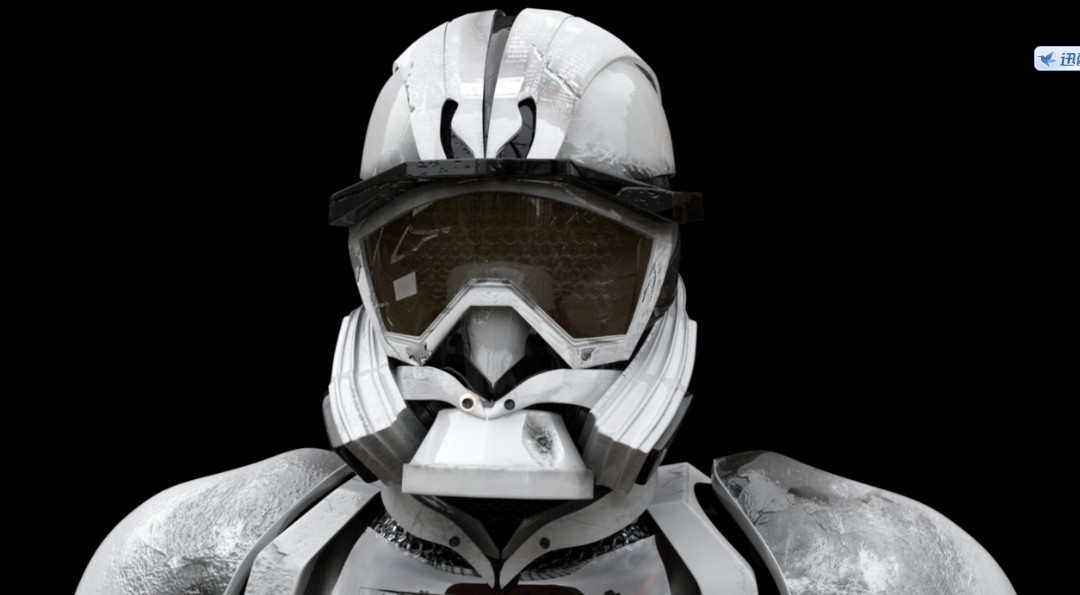 For the helmet part, i used overall bump map and standard one to make it looks like more layers and also more damaged.
 .
.
The chest part is the most chanllenged part.Our original idea is:to make an organic heart for the character and also have a close up shot for the heart which we gave up finally.For a visual effect short movie, it's very necessaey to make all of the part as realistic as possible, but to be honest, we couldnt acheive the real heart result perfectly and we dont have any animators in our team, so I created a crack on his glass chest to make it more detailed and let the audience not focus on the heart inside,but leave the heart's red there to rich the colours.

The back part, also used two types of bump map.

Our lucky number on the leg,cracks on the armour are all made in photoshop
Saturday, 8 June 2013

The heart sculpting and mistakes


I collected many reference images online for the heart for Ikaros, the first picture's texture and patterns on it are really beautiful and attractive, but the problem is :i can see the structure of heart clearly.
After i finished the first edition of the heart sculpting, i asked my roommate Sarah for help whose major is medical art. She did the correction for the heart for me(the 3rd one).
As Jin's considering, it's definately very heart to make the heart looks real , and we dont want to ruin the whole quality by the organic parts. We are still working on it, and considering whether we should keep the close-up shot for the heart or not.
sculpting and displacement map test


As u can see, the displacement didnt match perfect with the original mask low poly mesh. And the biggest problem is:our character has 7 different colours of his whole body which means we need to apply 7 different shaders for him. So the issue for the displacement map is:I need to seperate the model to 7 part with the same colour which is hard to make it,also, jack's already made the poses in every shots which means i need to apply the texture for the character shot by shot.
I am making and testing the bump map now, the effect is almost the same or even better than the displacement map i exported from Zbrush.
Subscribe to:
Posts (Atom)